どうも、Beyond the Pixelです。近年、計算流体力学(CFD)は、心血管疾患の診断と治療を支援する研究分野で注目を集めています。これは、侵襲性の高い手技に伴うリスクなしに、対象者特異的な貴重な情報を提供できるためです。CFDは熱、物質、運動量伝達のモデリングにおける確立された技術であり、航空宇宙、自動車、そしてバイオメディカル工学など多くの分野で応用されています。特に、心臓病学におけるCFDシミュレーションは、危険な侵襲的測定技術の必要性をなくすだけでなく、壁面せん断応力(WSS)など、直接測定できない特定の血行動態パラメータを測定できるため、広範囲にわたって研究が進められています。これは、一般的な集団に対する治療計画ではなく、個々のケースに合わせた、より個別化された治療へと繋がる重要なステップです。これらのシミュレーションを実行するために、「SimVascular」と「OpenFOAM」という2つの主要なオープンソースソフトウェアが利用されています。SimVascularは、医療画像データから血流シミュレーションを効率的に実行できる心臓病学に特化したソフトウェアです。一方、OpenFOAMは、様々な流体力学現象を多目的にモデリングできる、実績のあるCFDソフトウェアです。異なるCFDソフトウェアを使用する場合、最終結果が非常に類似していることが重要です。なぜなら、治療戦略の計画は、シミュレーションが一貫していて信頼できる場合にのみ支援され得るからです。本研究では、これら2つのソフトウェア間での結果の比較を通じて、CFDソフトウェアがシミュレーション結果に与える影響をより深く理解することを目指しています。
モデルセットアップ:SimVascularとOpenFOAMの比較
本研究では、OSMSC(Open Source Medical Software Corporation)の心血管および肺モデルリポジトリのデータを使用しています。具体的には、大動脈縮窄症(大動脈の狭窄)を持つ10歳の対象者が、狭窄部前後の大動脈を接続するために側々吻合手術を受けた後の、大動脈とその周辺血管のデータが用いられました。これにより、狭窄部の先に十分な血流を確保することを目的としています。
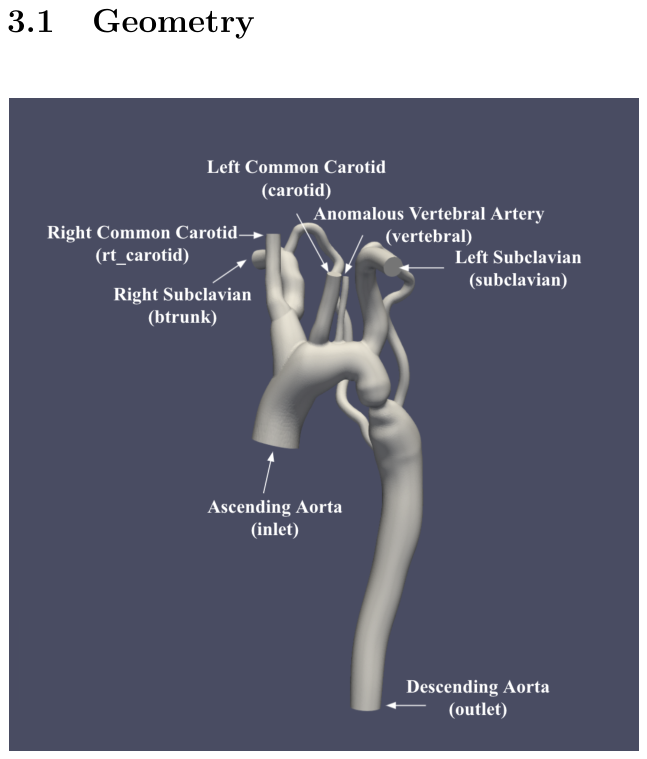
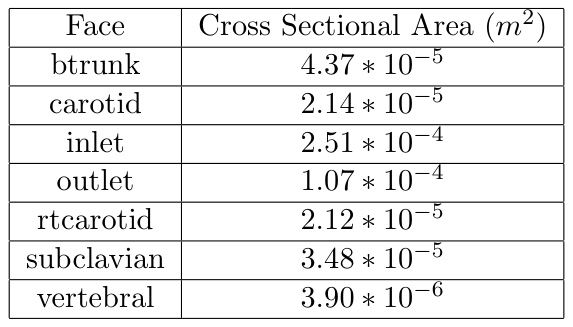
Figure 1. Figure 1: Labeled arteries and associated faces. Cross-sectional areas are provided in Table 2解説: 大動脈モデルにラベル付けされた動脈と関連する面を示しています。表2で各面の断面積が提供されています。
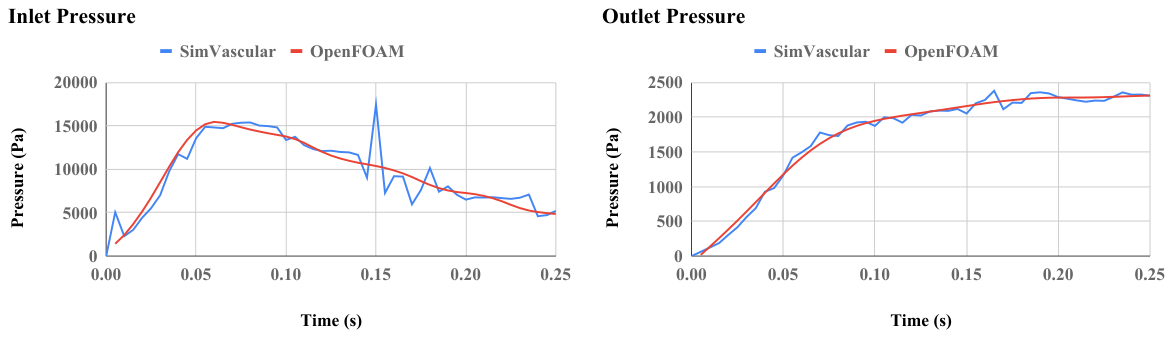
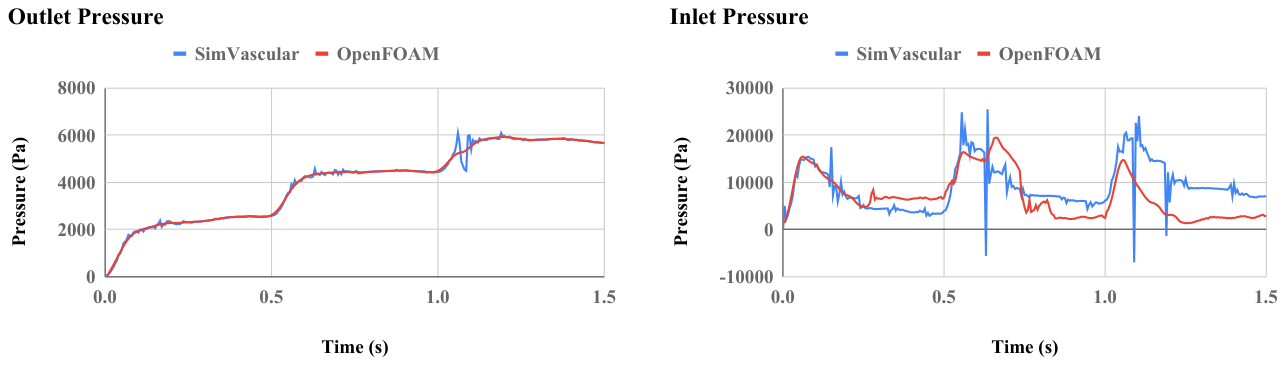
Figure 4. Figure 4: On the left: Simulated inlet pressure in SimVascular and OpenFOAM. The pressure pattern over time agrees well. On the right: Pressure values at the outlet in SimVascular and OpenFOAM. The pressure boundary condition at the outlet in OpenFOAM is prescribed from the simulated result from SimVascular, so the values match as expected.解説: 左側はSimVascularとOpenFOAMでシミュレーションされた入口圧力を示しており、経時的な圧力パターンはよく一致しています。右側は出口での圧力値を比較しており、OpenFOAMの出口圧力境界条件がSimVascularのシミュレーション結果から設定されたため、値は期待通り一致しています。
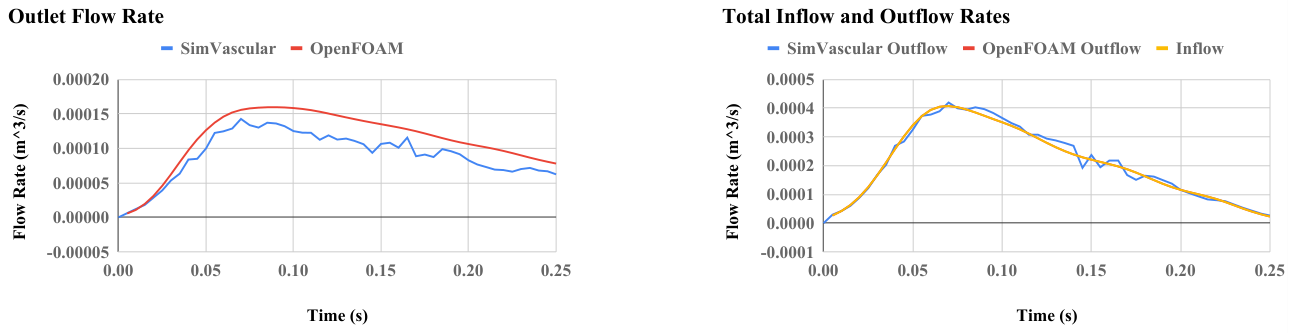
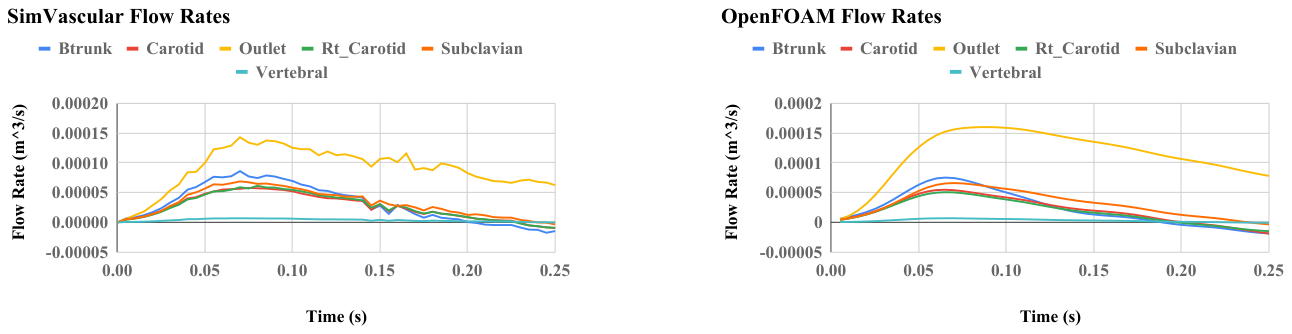
Figure 5. Figure 5: On the left: Flow rate at the outlet computed by SimVascular and OpenFOAM. On the right: Total flow rate at the outlets computed by SimVascular and OpenFOAM. The total outflow rate is the sum of outflow rates at all the outlets. The total outflow rate is compared with the flow rate at the inlet. The OpenFOAM outlet flow rate is identical to the inlet flow rate and the two curves are exactly superimposed.解説: 左側はSimVascularとOpenFOAMで計算された出口での流量を示しています。右側は総流入量と総流出量を比較しており、OpenFOAMの総流出量は流入量とほぼ同じであり、両曲線は完全に重なっています。Figure 6. Figure 6: On the left: SimVascular simulated flow rates the outlets. On the right: OpenFOAM simulated flow rates at the outlets.解説: 左側はSimVascularでシミュレーションされた各出口での流量を、右側はOpenFOAMでシミュレーションされた各出口での流量を比較しています。
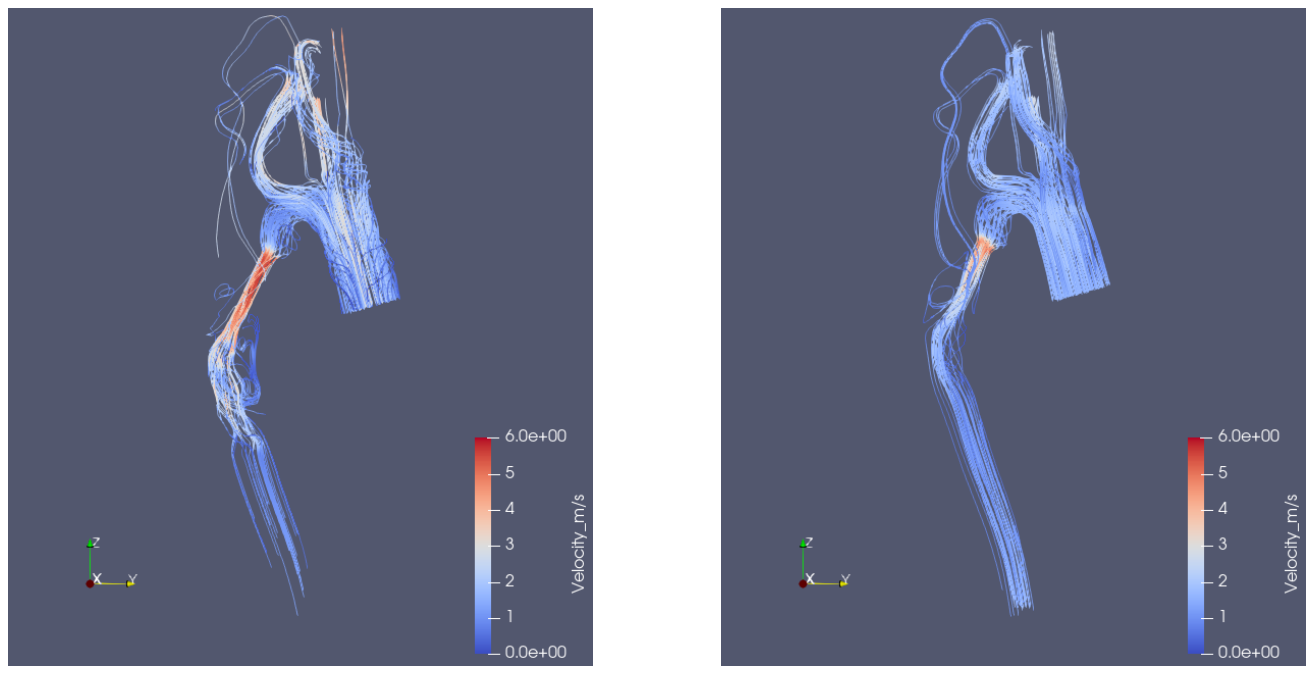
Figure 7. Figure 7: On the left: Velocity results from SimVascular at 0.07 seconds. On the right: Velocity results from OpenFOAM at 0.07 seconds. 0.07 seconds is chosen for the time to display results because it is when inflow rate is at the maximum. Note both color scales are identical, and all velocities are shown in m/s.解説: 0.07秒時点でのSimVascular(左)とOpenFOAM(右)の速度結果をストリームラインで可視化したものです。流入流量が最大になるこの時点での速度値と流れのパターンは良好な一致を示しています。
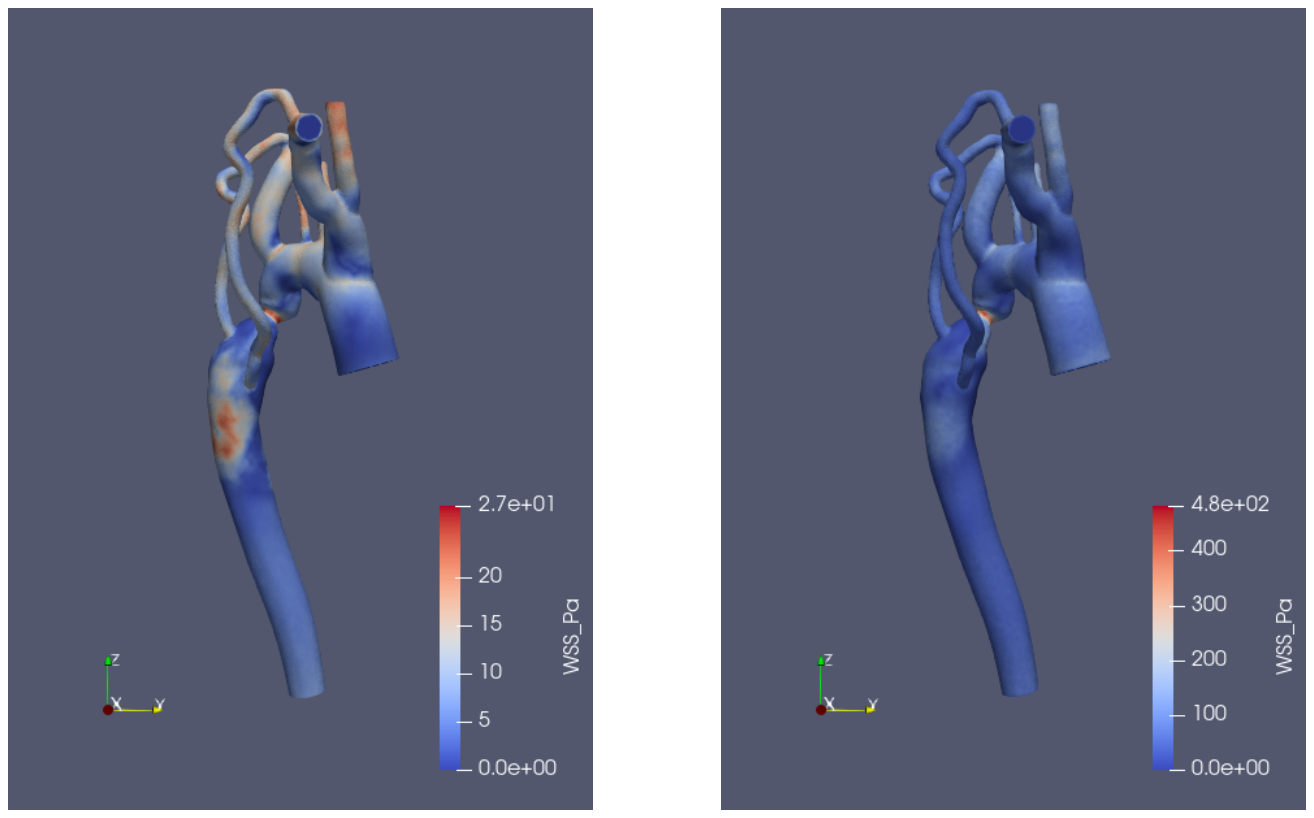
Figure 8. Figure 8: On the left: SimVascular WSS results at 0.07 seconds. On the right: OpenFOAM WSS results at 0.07 seconds. Similar qualitative patterns are observed with the WSS, but values are very different. Note the color scales are different due to drastically different values.解説: 0.07秒時点でのSimVascular(左)とOpenFOAM(右)の壁面せん断応力(WSS)結果を比較しています。定性的なパターンは類似していますが、値は大きく異なっています。カラースケールも大きく異なっています。
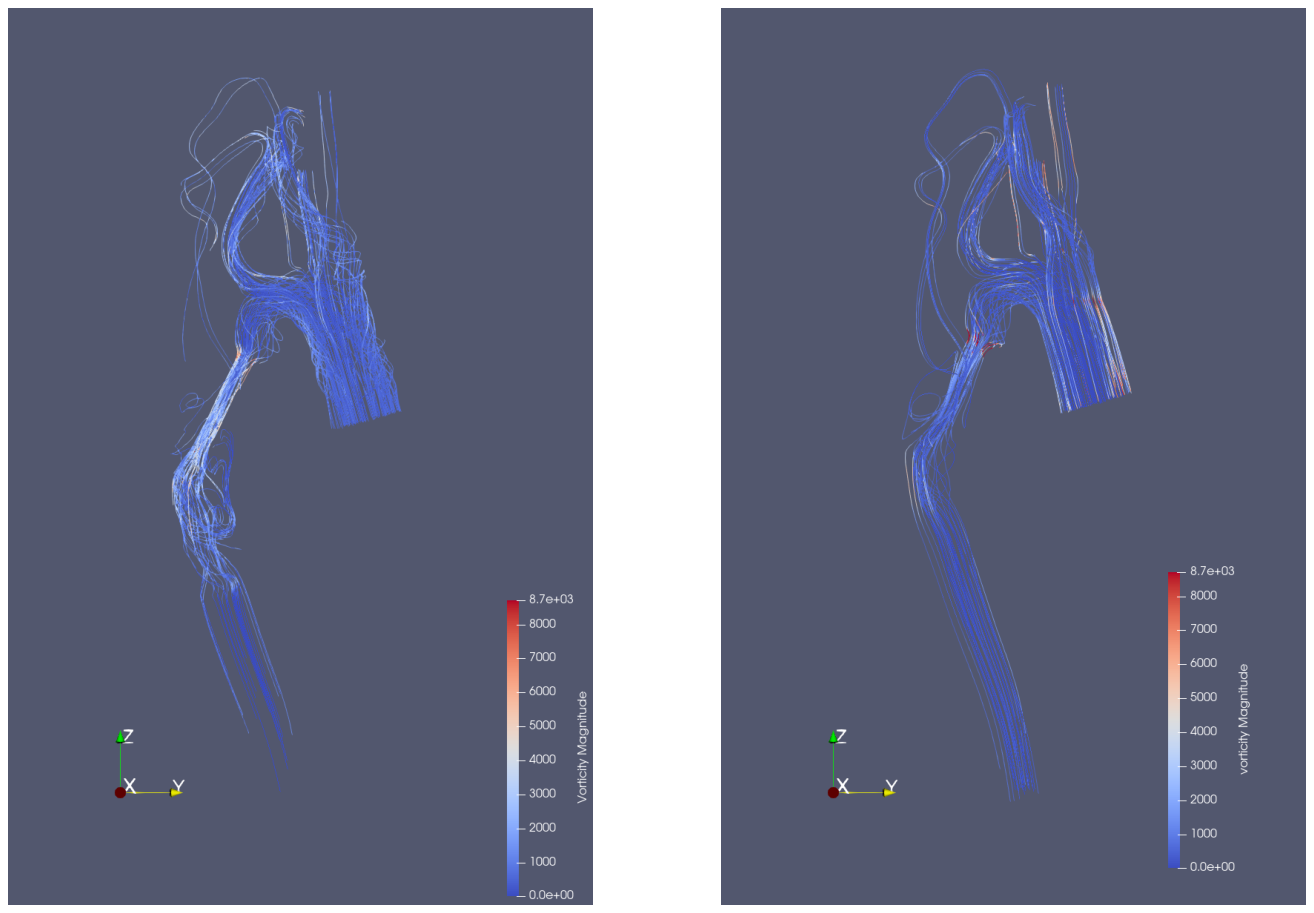
Figure 9. Figure 9: On the left: Vorticity results from SimVascular at 0.07 seconds. On the right: Vorticity results from OpenFOAM at 0.07 seconds. Similar qualitative results are shown, but values differ slightly. Color scales of both images are the same from 0 to 8700 1/s.解説: 0.07秒時点でのSimVascular(左)とOpenFOAM(右)の渦度結果を示しています。定性的な結果は類似していますが、値はわずかに異なります。両画像ともにカラースケールは0から8700 1/sで同一です。
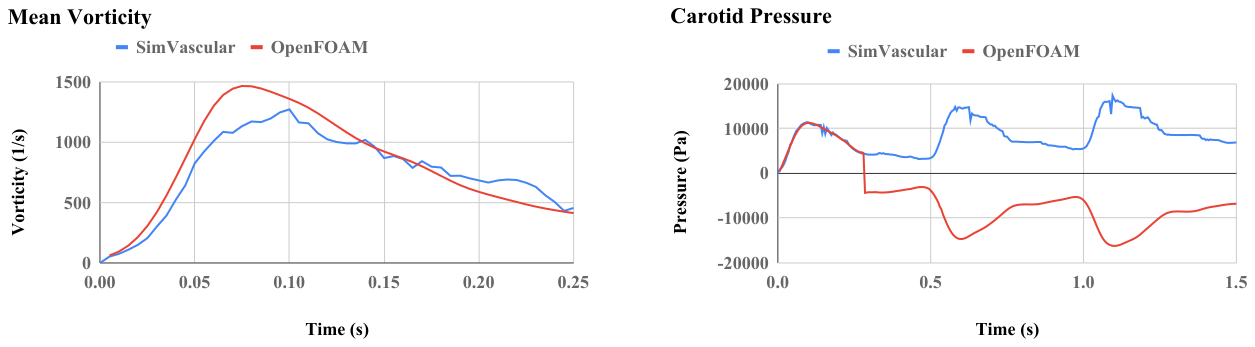
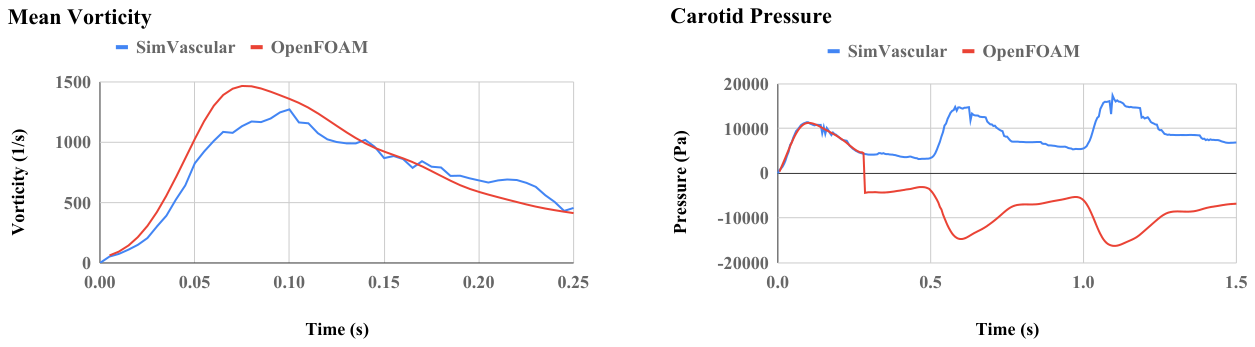
Figure 10. Figure 10: Mean vorticity calculated by both SimVascular and OpenFOAM are shown over time. The values are reasonably similar.
Figure 11
Figure 11. Figure 11: Carotid pressures over time in Sim- Vascular and OpenFOAM are shown. Note that the pressure in SimVascular is inputted as the pressure boundary condition in OpenFOAM. At around 0.25 seconds, the OpenFOAM pressure is essentially a mirror image of the prescribed boundary conditions.
Figure 12
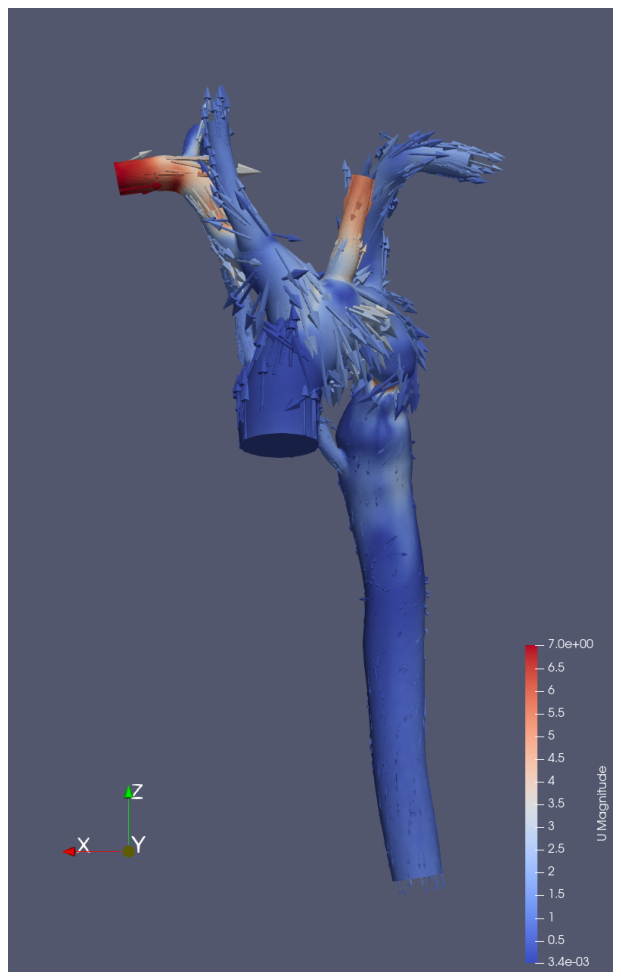
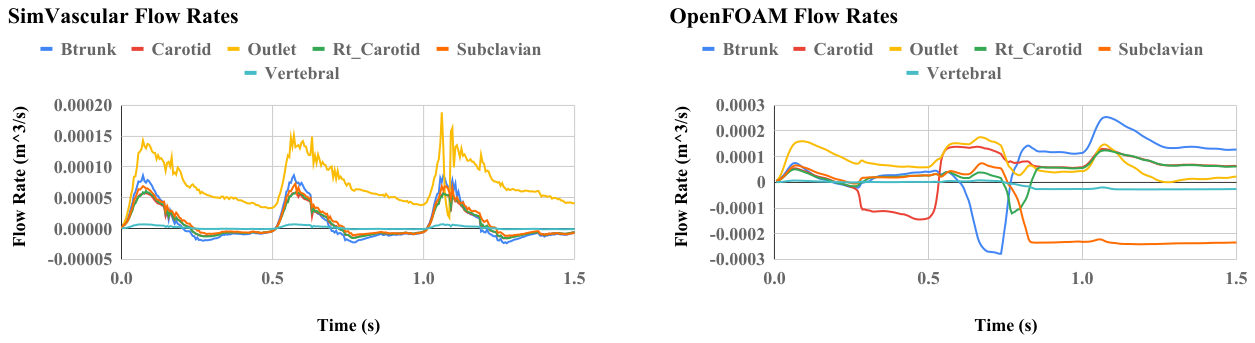
Figure 12. Figure 12: Glyph of velocity at 0.7 seconds. There is clearly significant inflow in the Btrunk face, which is very unexpected.
Figure 13
Figure 13. Figure 13: On the left: SimVascular simulated flow rates the outlets. On the right: OpenFOAM simulated flow rates at the outlets. Clearly, there is inflow at unexpected faces at times after 0.25 seconds in the OpenFOAM simulation.
Figure 14
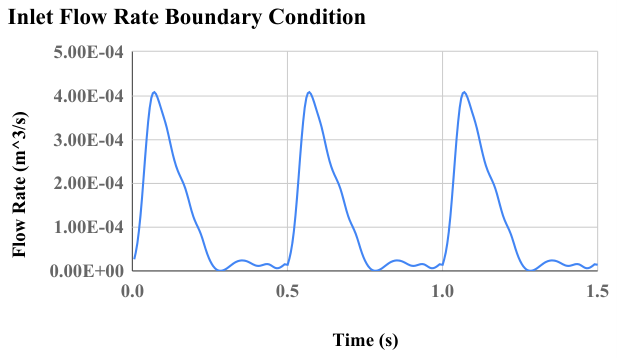
Figure 14. Figure 14: Pressure values simulated in SimVascular over three periods of inlet flow. Both pressures in SimVascular increase every period. The OpenFOAM outlet pressure also increases every period, as prescribed by the boundary condition. However, the calculated inlet flow in OpenFOAM does not increase like that of SimVascular does.

コメントを残す